 MCF User Guide
National Mourning
The National Mourning module helps your council respond appropriately to the death of a senior member of the Royal Family, or an accession. With one action you can show a respectful banner, a homepage tribute, and quietly pause promotional and scheduled content for the period of mourning.
It is worth preparing a mourning event in advance and leaving it inactive, so that when the time comes you only need to activate it. You can pre-write the tribute text and choose which features to switch on, then review and activate in a moment.
Mourning events
Each period of mourning is held as a mourning event, which you manage from the admin panel. An event records which protocol applies, the tribute content, and the set of features to apply while it is active. You can have an event sitting ready in draft and only switch it on when needed.
The module recognises the established operational protocols (such as the plans for the death of the monarch or other senior royals) as well as a custom option for situations they don't cover.
Activating a mourning event
- In the admin panel, open the National Mourning area (under the Settings navigation group).
- Open your prepared event, or create a new one. The form is organised into tabs — Details, Tribute Content, Features and Branding.
- Check the tribute text, portrait image and flag-status note on the Tribute Content and Branding tabs.
- On the Features tab, confirm which elements should apply (banner, takeover, tribute page, content pauses — see below).
- Save, then use the Activate action on the event to bring it live.
To stand the site down at the end of the mourning period, open the active event and use the End action.
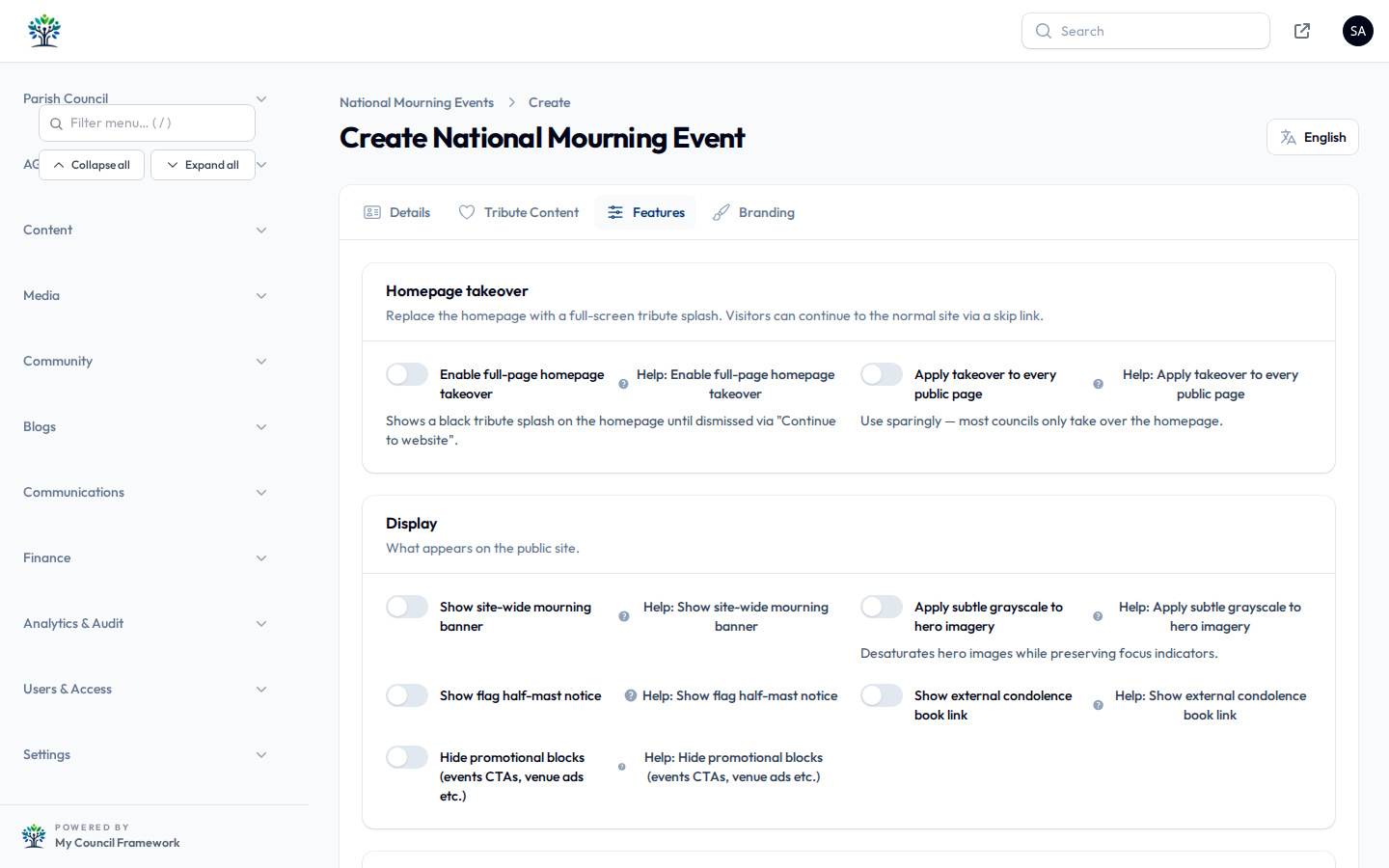
The banner and homepage takeover
When an event is active you can choose how prominent the response is:
- Banner — a respectful notice strip shown across the top of the site, optionally carrying a note about flags being flown at half-mast.
- Homepage takeover — a full-page tribute splash shown when a visitor first arrives. Visitors can move past it to continue to the website, and it stays dismissed for the rest of their visit. You can also extend the takeover to every page rather than just the homepage.
- Grayscale — an option to render the homepage hero in muted greyscale for a more sombre tone.
The takeover always offers a way through to the normal site, and the admin panel is never affected — you and your team can keep working as usual while the takeover is live for the public.
The tribute page
The module can publish a dedicated tribute page built from a mourning tribute block. The block can show a portrait, the tribute message, the flag-status notice and an optional link out to an official book of condolence. If you prefer, the tribute page can be created for you automatically when the event is activated.
Pauses while mourning is active
Beyond the visible banner and tribute, the module can quietly hold back content that would feel out of place during a period of mourning. On the Features tab you can choose to:
| Pause | Effect |
|---|---|
| Scheduled news | Holds back news items that were scheduled to publish during the period, so nothing promotional appears unexpectedly. |
| Scheduled events | Holds back scheduled event listings in the same way. |
| Newsletter | Prevents newsletter campaigns from being sent while mourning is in effect. |
| Social sharing | Hides the social share buttons on content. |
| Promotional blocks | Hides upbeat call-to-action and newsletter sign-up blocks across the site. |
| Meetings | Offers a one-click way to postpone upcoming meetings in bulk, where the council decides to do so. |
These are pauses, not deletions. When you end the mourning event, paused news and events become visible again, the newsletter can be sent, and promotional blocks reappear — nothing is lost.