 MCF User Guide
Committees
Many parish councils delegate work to sub-committees, such as Planning or Finance. You keep the list of committees here and tick which ones each councillor sits on, and their public profiles show it.
What committees are for
Many councils delegate work to sub-committees, such as Planning, Finance or Amenities. In the CMS a committee is a name you can attach to councillors: each councillor's public profile lists the Sub-Committees they sit on. The CMS calls them committees in some places and sub-committees in others; they're the same thing.
There is no public committees page, and committees aren't linked to meetings. Publish committee meetings, agendas and minutes under Meetings & Documents, and use a page if you want to explain each committee's remit.
Adding a committee
- Go to Parish Council > Councillors. Committees have no menu item of their own.
- Select Manage Sub-Committees at the top of the list.
- Select New committee.
- Fill in the fields below, then select Create. You return to the list.
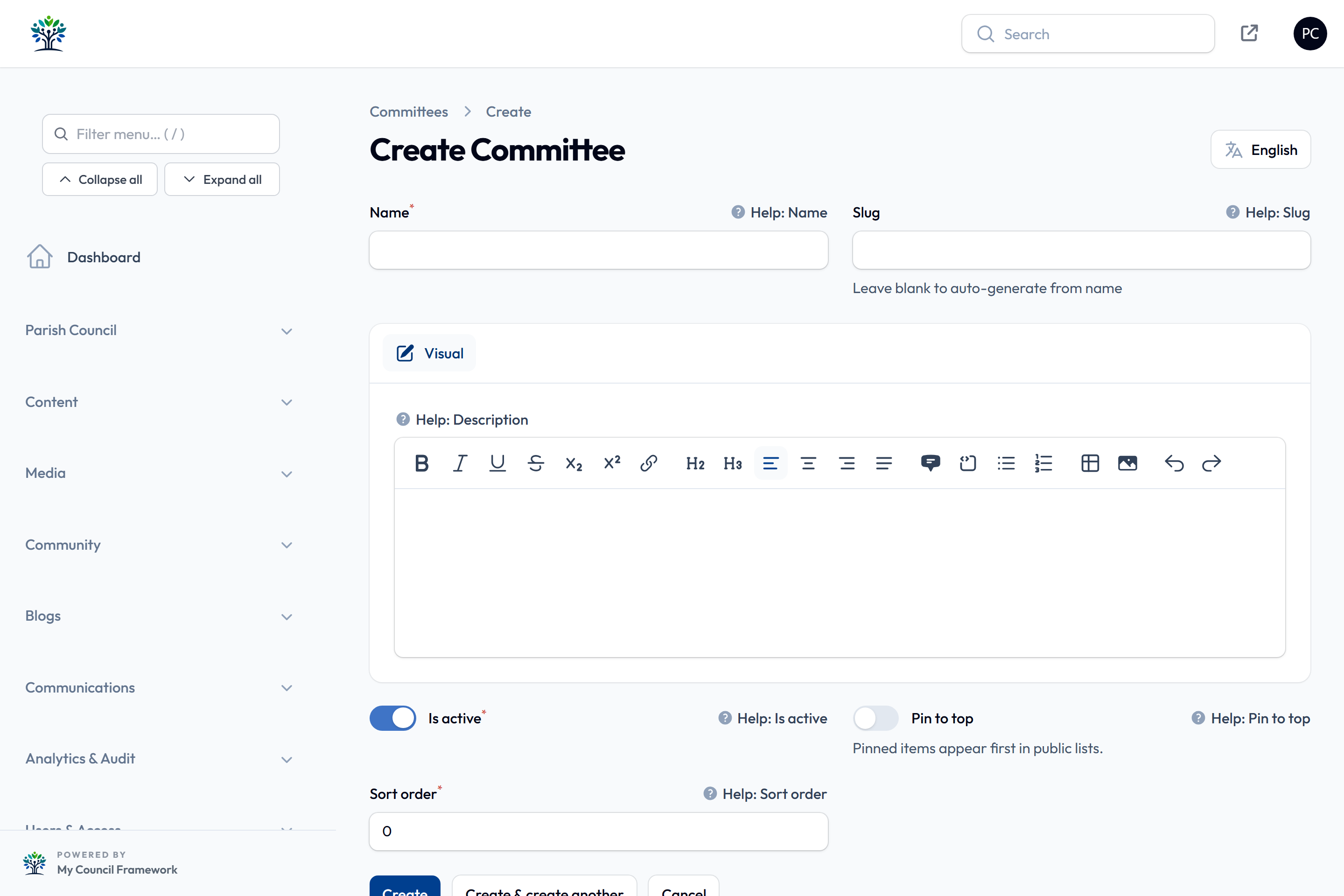
| Field | What to enter |
|---|---|
| Name | The committee's name, such as "Planning Committee". |
| Slug | Leave blank and it is made from the name. |
| Description | Optional notes for your own records. It isn't shown on the website. |
| Is active | On by default. Switch off to hide the committee from councillors' profiles and forms. |
| Pin to top, Sort order | Its place in the list: pinned first, then lowest number first. |
Recording membership
Membership is set on each councillor, not on the committee:
- Go to Parish Council > Councillors and select Edit on a councillor.
- Under Sub-Committees, tick each committee they sit on. Only active committees are listed.
- Select Save changes.
The councillor's public profile then shows their sub-committees. There's no separate chair or vice-chair setting for a committee; if you want to show who chairs it, say so in the councillor's Responsibilities.
Editing and removing committees
On the Sub-Committees list, the Members column shows how many councillors sit on each one. Select Edit to change a committee, or Delete to remove it. To bring back a deleted committee, set the Deleted records filter to show it, then select Restore. Only a super administrator can delete permanently.
When a committee is wound up, switch off Is active. It disappears from councillors' profiles and forms, but the record and its members are kept in case it's revived.
Use the English / Cymraeg button at the top of the page to switch the form to Welsh, then type the Welsh name and save. Each language is saved separately.